11 Best Wedding Photo Sharing Apps 2027

Sam Erickson
Updated
Your photographer captures the ceremony, but your guests capture everything else: the candid table moments, the tearful toasts, the children running between legs on the dance floor. The best wedding photo sharing apps make collecting those photos effortless. No chasing group chats, no compressed images, no asking your maid of honor to AirDrop you 200 photos. This guide compares 11 of the most popular options by real pricing, free tiers, upload windows, and guest experience, with every price checked against each app's own pricing page in November 2026.
What to look for
Before diving into specific apps, these are the features that actually matter on your wedding day:
- No app download required. If guests have to install something, most of them won't bother. The best solutions work entirely in the browser.
- QR code access. A scannable code on table cards is the lowest-friction way to get guests into the gallery. Every phone camera can scan one natively.
- Unlimited uploads. A cap on photos, or on shots per guest, means you may miss memories. Look for unlimited plans, especially for larger weddings.
- A long upload window. Many guests only get around to sharing photos weeks after the wedding. A gallery that closes after 30 days misses them.
- Full-resolution downloads. Compressed photos are not useful for printing. Make sure you can download in the original quality.
- Moderation controls. Weddings occasionally attract an inappropriate upload. An approval setting or instant delete is worth having.
- Transparent pricing. A one-time fee is almost always better value than a subscription for a one-day event. Watch for per-guest pricing too, which climbs quickly for larger weddings.
The apps
1. Qrowd PicsTop Pick
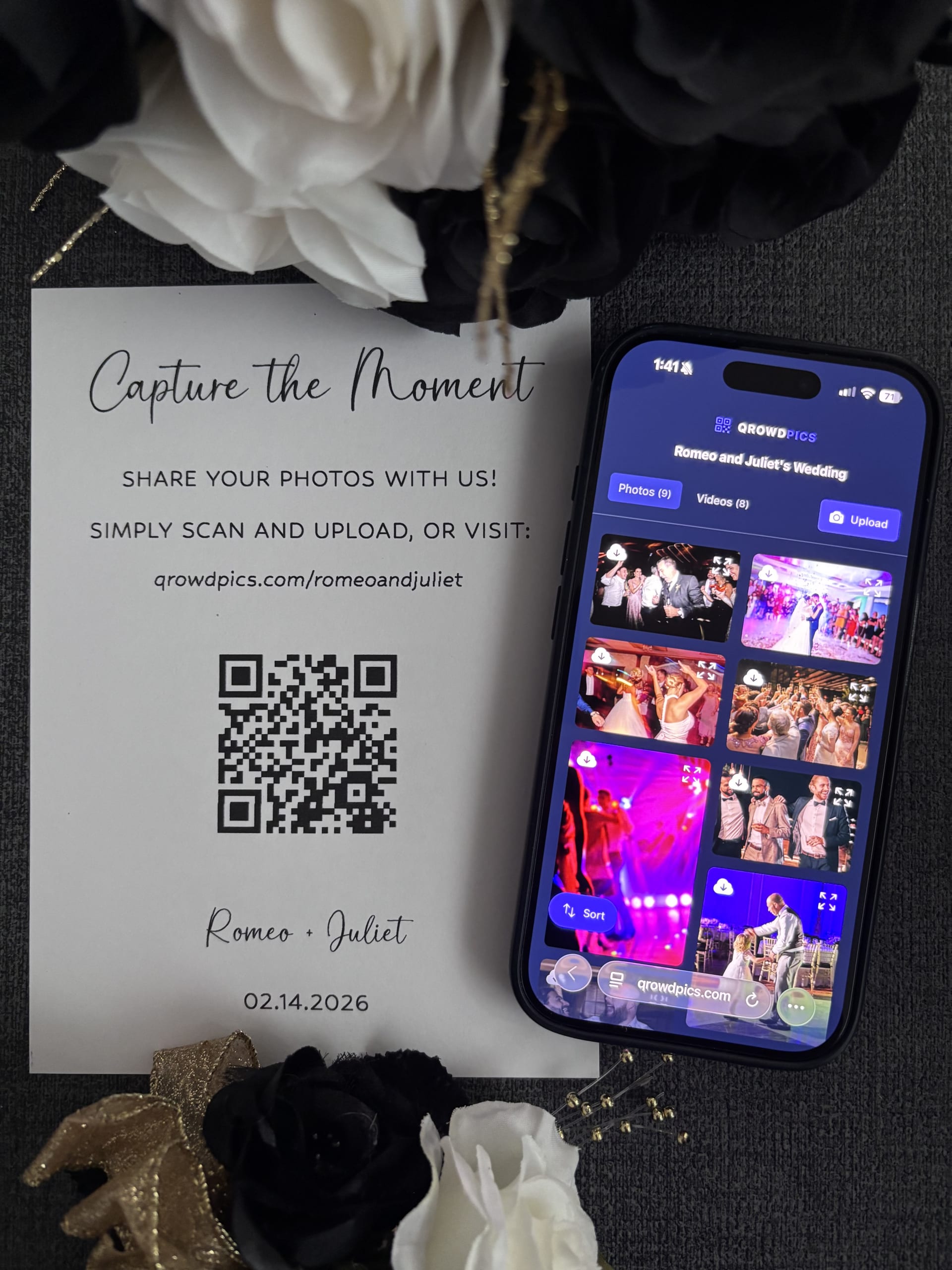
Qrowd Pics is built around a single principle: guests should be able to upload without downloading anything or creating an account. You generate a QR code, print it on your table cards (a printable sign template is built in), and guests scan it to open a shared gallery where they can upload photos and videos straight from their phone's camera roll.
Pricing is a one-time fee of $39 for the Standard plan (unlimited photos and videos, 6-month upload window, 1-year download window) or $49 for Premium (adds upload approval, guest name and message collection, and a live full-screen slideshow). There is no subscription and no per-guest pricing. A free tier with 20 uploads and a 1-day upload window lets you test the guest experience first.
- ✓ No app download or account required for guests
- ✓ Unlimited photos and videos, any number of guests
- ✓ Full-resolution downloads individually or as a ZIP
- ✓ Upload approval and live full-screen slideshow on Premium
- ✓ Printable QR code sign template on every plan
- ✓ One-time fee, no subscription
Best for couples who want every guest photo and video at a flat, low price, with plenty of time for guests to upload after the wedding. You can try the guest experience with the live demo.
2. Kululu
Kululu covers a broad range of event types like birthday parties, corporate events, and graduations rather than focusing only on weddings. It includes a live photo wall on all plans, and its free plan allows 100 uploads over a 24-hour window.
The paid limits are worth noting. The Plus plan is $39 but caps uploads at 500 photos and videos, keeps the gallery open for uploads for only 1 month, and stores them for 3 months. Unlimited uploads require the Pro plan at $99, which extends storage to 1 year but still limits uploads to 3 months. For a single wedding, Qrowd Pics offers unlimited uploads and a longer upload window at the same $39 entry price. See the full Kululu comparison.
3. Guestpix
Guestpix is one of the most established names in guest photo sharing, with a polished gallery and a live slideshow included in every package. It now offers a free preview with 50 photos and a 30-day upload window, which is enough to try it out before buying.
Paid plans include unlimited photos and videos, but the upload windows are tied to price. The Classic plan is $49 with a 3-month upload window and 12 months of hosting. The Signature plan is $89 for a 12-month upload window. The Signature Bundle is $119 for three galleries with 24 months of uploads and hosting, for couples with several events. Every plan includes content moderation and a written and video guestbook. Compared to Qrowd Pics, Guestpix costs $10 more at entry for half the upload window. See the full Guestpix comparison.
4. GuestCam
GuestCam includes a live slideshow and an audio guestbook on all plans. The Standard plan is a one-time $49 with a 6-month upload window and 12 months of storage. The Premium plan is $97 with a 12-month upload window, 14 months of storage, and up to six separate galleries, each with its own QR code. A face search add-on costs $45 more. There is no free tier.
GuestCam is a strong choice if the audio guestbook matters to you. If it does not, Qrowd Pics matches the 6-month upload window at $39, and its $49 Premium plan adds a live slideshow and upload approval at the same price as GuestCam's Standard plan. See the full GuestCam comparison.
5. Wedibox
Wedibox is a wedding planning suite with guest photo sharing built in, alongside a wedding website, RSVPs, and an audio guestbook. Its free plan includes a wedding website and 50 guest uploads. The paid plans are one-time: Embed at $29 (a gallery widget for an existing wedding website, 3-month upload window), Wedding at $49 (6-month upload window, 1 year of storage, live slideshow), and All-In-One at $79 (1-year upload window, 2 years of storage, plus RSVP and seating tools).
If you want your wedding website and photo gallery in one place, Wedibox is worth a look. If you already have a website, or the event isn't a wedding, Qrowd Pics gives the same 6-month upload window for $39 and works for any kind of event. See the full Wedibox comparison.
6. WedPicsQR
WedPicsQR is a simple QR code photo page for weddings. Guests scan the code and upload from their phone with no app. The free Starter plan allows 50 photos kept for 14 days. The Single Photo Page plan is $29.99 (listed down from $49) for up to 150 photos and 12 months of storage. The Unlimited Photo Pages plan is $39.99 (listed down from $89) for unlimited photos and videos across multiple pages, also with 12 months of storage. Both are one-time fees.
The 150-photo cap on the $29.99 plan is tight for a wedding of any size, so most couples would need the $39.99 plan. WedPicsQR doesn't state an upload window. Qrowd Pics costs about the same at $39, states a 6-month upload window, and adds upload approval and a live slideshow on its $49 Premium plan.
7. Fotify
Fotify is a browser-based event app that combines photo sharing with invitations and RSVPs. The free tier allows 50 photos (compressed) with a 7-day upload window. The Photo Gallery plan is $29.99 for unlimited full-resolution photos with a 30-day upload window and 90 days of access. Premium Event is $49.99 with a 90-day upload window, a year of access, and short video clips. Professional Event is $79.99 for a 180-day upload window. A live photo carousel is included on every plan.
The upload windows are the main limitation for weddings. At $29.99, guests have 30 days to upload and cannot share video. A 6-month window costs $79.99 on Fotify versus $39 on Qrowd Pics.
8. Guestlense
Guestlense positions itself around physical add-ons. The Digital Guestbook plan is $49 with unlimited photos and videos and a live slideshow. The $99 plan adds 30 printed QR cards, and the $199 plan adds 50 polaroid-style prints. All plans give guests a 3-month upload window and a 12-month download window. There is no free tier.
If printed QR cards shipped to your door are useful, Guestlense bundles them conveniently. If you're happy printing your own, the $49 base plan has a shorter upload window than Qrowd Pics's 6 months at $39.
9. Lense
Lense is a disposable camera app that runs in the browser. Guests scan a QR code and get a camera with a set number of shots (25 each by default) and film-style filters, and the host chooses whether photos appear instantly or after a reveal. It is free for up to 7 guests, then priced by guest count: $34.99 for up to 100 guests and $99.99 for up to 500, as of November 2026. Unlimited shots cost about $10 more, and video clips (up to 1 minute) are a $9.99 add-on. A live slideshow is included.
Lense is fun for the disposable camera feel, but the price climbs with the guest list and the extras. For a flat price whatever the guest count, with every photo and video included, Qrowd Pics is the simpler choice. See the full Lense comparison.
10. POV
POV is another disposable camera app. Guests scan a QR code to get a camera on their phone with no app download, the host sets how many photos each guest can take, and photos can stay hidden until a reveal, often the next morning. It is free for up to 10 guests, then $34.99 for up to 100 guests and $89.99 for up to 250, as of November 2026. POV is photo only.
The reveal is POV's charm. The per-guest shot limit and the lack of video are the tradeoffs. Qrowd Pics can recreate the reveal with upload approval on its Premium plan: guests upload all night, nothing shows until you approve it, then the whole gallery appears at once. See the full POV comparison.
11. Google Photos Shared Albums
Google Photos is free and familiar, which makes it appealing on the surface. You can create a shared album, generate a link, and turn that link into a QR code with any free QR code generator. Guests can view photos without an account. The catch is that to upload photos to the album, guests need a Google account. Anyone without one, or anyone not signed in on their phone, cannot contribute.
For a small gathering where you know every guest has a Google account, it works at no cost. For a wedding with 100 or more guests of varying ages and tech comfort, the account requirement will quietly cut out a meaningful share of your contributors. The purpose-built apps above all avoid this friction.
Quick comparison
Prices in USD, one-time per event unless noted.
| App | Free tier | Guests need | Unlimited photos | Video | Upload window | Download window | Starting price |
|---|---|---|---|---|---|---|---|
| Qrowd Pics | 20 uploads, 1 day | Nothing | ✓ | ✓ | 6 months | 12 months | $39 |
| Kululu | 100 uploads, 24 hours | Nothing | Pro ($99) | ✓ | 1–3 months | 3–12 months | $39 |
| Guestpix | 50 photos, 30 days | Nothing | ✓ | ✓ | 3–12 months | 12 months | $49 |
| GuestCam | — | Nothing | ✓ | ✓ | 6–12 months | 12–14 months | $49 |
| Wedibox | 50 uploads | Nothing | ✓ | ✓ | 3–12 months | 1–2 years | $29 |
| WedPicsQR | 50 photos, 14 days | Nothing | $39.99 plan | $39.99 plan | Not stated | 12 months | $29.99 |
| Fotify | 50 photos, 7 days | Nothing | ✓ | From $49.99 | 30–180 days | 90–365 days | $29.99 |
| Guestlense | — | Nothing | ✓ | ✓ | 3 months | 12 months | $49 |
| Lense | Up to 7 guests | Nothing | About $10 extra | $9.99 extra | Not stated | 12 months | $4.99 (25 guests) |
| POV | Up to 10 guests | Nothing | — | — | Not stated | Not stated | $4.99 (25 guests) |
| Google Photos | ✓ | Google account | ✓ | ✓ | No limit | No limit | Free |
Which one should you choose?
Across all eleven options, the decision comes down to four things: upload window length, guest friction, whether you want every photo or a limited disposable-camera roll, and whether the price is flat or per guest.
- Best overall for most couples: Qrowd Pics. A 6-month upload window at the lowest price, unlimited photos and videos, no app download, and a free tier to test before buying.
- Best for an audio guestbook: GuestCam, which includes one on every plan.
- Best all-in-one wedding suite: Wedibox, which bundles a wedding website, RSVPs, and photo sharing.
- Best for a disposable camera feel: Lense or POV. Both hand guests a limited roll of shots with a reveal, priced by guest count.
- Best for a live venue slideshow: Most dedicated apps now include one. GuestCam, Guestpix, Kululu, Fotify, Guestlense, and Lense include it on every plan, Wedibox from its $49 plan, and Qrowd Pics on its $49 Premium plan.
- Best if you want printed QR cards shipped to you: Guestlense.
- Best free option: Google Photos, if every guest has a Google account. Otherwise, the free tiers of Kululu (100 uploads) and Guestpix (50 photos) are the most generous among the dedicated apps.
If you only need the gallery for a single wedding, a one-time fee makes far more sense than a subscription. Among the one-time options, upload window length is the deciding factor. Fotify gives 30 days at entry, Guestlense and Guestpix give 3 months, and Qrowd Pics, GuestCam, and Wedibox give 6 months, with Qrowd Pics the lowest price of the three.
GuestCam vs Guestpix: what is the difference?
Both start at $49 and both include a live slideshow, so that is no longer the deciding factor. GuestCam includes an audio guestbook where guests can leave voice messages alongside their photos, while Guestpix has a written and video guestbook. Guestpix also has a free preview for trying it out, and GuestCam does not.
On upload windows, GuestCam's Standard plan gives guests 6 months to upload. Guestpix's Classic plan gives 3 months at the same $49 price. To get 12 months on Guestpix you pay $89, and on GuestCam you pay $97.
If the audio guestbook matters, GuestCam is the better choice. If it does not, the upload window is the bigger difference between the two, and Qrowd Pics covers the same core use case for $39 with a 6-month upload window, plus a matching live slideshow on its $49 Premium plan.
Further reading
- How to Share Photos at a Wedding with Guests: practical tips on QR code placement, getting guests to upload, and sharing the gallery back with everyone.
- Best Way to Share Wedding Photos: a head-to-head comparison of every method couples use, from group chats to dedicated galleries.
- Wedding Photo Booth vs. QR Code Photo Sharing: Cost Compared: a real cost breakdown of a photo booth rental versus a QR code gallery, including hidden fees and whether you need both.
- New: Live Photo & Video Slideshow for Your Event: Qrowd Pics Premium's live full-screen slideshow displays every guest photo and video on a screen at your venue in real time.
- Disposable Cameras vs. QR Code Photo Sharing for Weddings: what disposable cameras really cost, how long film takes to develop, and how to combine them with a QR code gallery.
Try Qrowd Pics before your wedding
See the guest experience live with no sign-up required, or create a free event to test the full upload flow.